Home » Posts filed under Digital Video
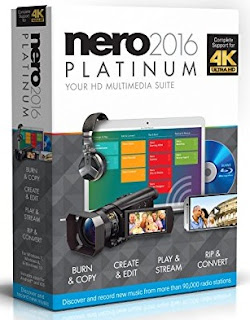
Nero 2016 Platinum is the top class for burning, editing, converting, managing and playing all digital media, including 4K videos, also on home-networked Wi-Fi players, thanks to the new Streaming Player App. Windows 10 support, 4K Ultra HD support, and razor-sharp single or double-monitor video edit previews all ensure constant premium-quality creativity.
Plus: Free MP3 recording from thousands of worldwide web radio stations; 25 brand-new design templates and state of the art support for paper printing stock; image, text, sound effects; automatic sound enhancement; audio filters; professional videos with menu templates, on-screen navigation, and graphics.
Description :
- Reliable copying and burning technology for CDs, DVDs, and Blu-ray Discs*
- Ripping of CDs, DVDs, AVCHDs, and Blu-ray Discs*
- Conversion into virtually any video, photo, and audio formats for optimum usability - even on the latest mobile devices
- Playback of photos, 4K videos, DVDs, AVCHDs, music, and slide shows
- *Suitable for use only with private and non-copyright-protected content
Full Post
AnyMP4 DVD Creator is the DVD burning software to convert all the video formats to DVD-format discs, DVD folders and ISO files. It supports any popular format like AVI, MPEG, 3GP, MP4, VOB, FLV, M2TS, MTS, TS, SWF, MKV, MPG, MPA, DAT, DV, NSV, MOV, QT, RMVB, etc. It also supports all DVD types, including DVD-R/RW, DVD+R/RW, DVD+R DL, DVD-R DL, DVD-5 and DVD-9 etc. With this, you can enjoy high-quality DVD discs. Besides, our DVD burner also allows you to convert your video to DVD folder or ISO files when you do not want to burn it right now.
Description :
- Burn your DVD discs with any video you have
- Convert your video to DVD folder or ISO file for your back-up or further burning
- Add audio track and subtitle as long as you like
- Customize your DVD discs with the DVD menu
- Add background music, picture and opening films to your burned DVD
Full Post
liteCam HD is an easy-to-use PC screen recording/capture software that helps create professional-looking HD videos in no time! Simply record anything on your PC screen in full HD and stereo sound. Gaming videos, tutorials, demonstrations, presentations, school projects and much more. Its simple and powerful interface allows you to make a recording within seconds of installation, without the stress of complex settings and special requirements.
Convert your recorded videos to MP4 or WMV format with small file size and high resolution to upload to YouTube or watch on your mobile device (Android/iOS). Rsupport Screen Capture Codec (RSCC) offers the highest compression/quality and 30% faster speed when compared to TechSmith Screen Capture Codec (TSCC). Additionally, RSCC boosts encoding speed up to twice as fast as competitors.
Description :
- Simple to use Screen Capture/Video Recording Software (1080p HD)
- Record Anything you see on your screen - Perfect of Video Games! No Freezing. No Slowdowns.
- High FPS with lossless compression - great for sharing (YouTube, Twitch, Blogs, Vimeo)
- Add titles, words, mouse effects, drawings, logos, etc. PLUS editing features and scheduled recordings
- Rated 4-Stars (Excellent) by CNet and 4.5-Stars by CNet Users
Full Post
The all-new Dragon Professional Individual drives productivity at work by enabling fast, accurate dictation and transcription with the right level of customization to speed document creation. Create, edit and format documents by voice—quickly and accurately—so you spend less time on paperwork and more time on activities that boost the bottom line. Add custom words such as specific industry terminology, insert frequently-used custom text or shortcut repetitive tasks by voice to work faster and smarter- whether you’re creating documents, spreadsheets and presentations, sending emails, filling out forms or simply looking to reduce the physical stress of typing.
Description :
- Brand New to Dragon! Sync your customizations with the separate, cloud-based Dragon Anywhere app that provides professional-grade continuous dictation capabilities on your iOS or Android mobile device to achieve seamless productivity- both in the office and on the road
- Ability to accurately transcribe another single speaker's voice from pre-recorded audio files or from podcasts without having to create and train a profile using a recording of that single speaker reading pre-selected text
- Newly designed Dictation Box, so you can easily create or edit text by voice even in applications not supported by Dragon
- Includes option to save synchronized audio from dictation done in certain apps by saving a .dra file along with the transcribed text. m4a format is now supported along with .wav, .wma, .mp3, .dss, and .ds2
- Supports Section 508 standards to eliminate barriers for individual workers with disabilities that limit their ability to use a keyboard and mouse. In addition, it helps prevent fatigue and repetitive stress injuries by offering a comfortable, ergonomic alternative to the keyboard and mouse

Full Post
With Movavi Video Editor, you can create spectacular videos even if you’re absolutely new to the movie-making process. All you need to do is just drop your media files onto the timeline and let your imagination do the rest! Create your own movies using multiple filters, transitions, titles and special effects: show several videos on one screen with the Picture-in-picture tool, imitate the camera zoom, change the background with the Chroma Key effect, make your video look like an old-style movie, slow down the playback with Slow Motion, and more. Automatically improve video quality with Magic Enhance or manually adjust color parameters such as brightness, contrast, saturation, etc. Remove motion distortion with the Stabilization tool.
Description :
- Cut, trim and join video fragments, enhance video quality
- Insert animated fades between the fragments, apply special effects and filters
- Add captions: choose between different styles, colors and fonts
- Grab video from a webcam, TV-tuner, or other external devices
- Choose between 180+ media formats to export your files and many more!
Full Post
The most important thing to know about Typesy is that it really works. That’s because it was created by the world’s foremost typing experts. It’s the only program that’s scientifically designed to make learning to type fast and easy. We spent over 6 years of research in typing, motor learning, and computer science. The result? It’s now easy to type fast, get that dream job, and save your valuable time.
Typesy constantly monitors your progress and adapts to your needs. Each lesson is customized for your current skill level. This makes learning to touch type easy and fast. In just a few days, you’ll be chatting faster on social media, increasing efficiency at work, and reducing painful RSI.
Description :
- Step-By-Step Video Instruction - to help you learn the correct typing technique, and make learning enjoyable.
- Scientifically designed typing exercises - to teach you fast typing in the shortest possible time.
- Social profile - to keep you motivated and engaged as you learn.
- Detailed reports - so you can see your progress and how best to improve.
- 5 accounts included - so the whole family can learn together. Each account is good for 3 full years.
Full Post
PaperPort Professional 14 is the most productive and cost-effective way for everyone in your office to scan, organize, find, and share scanned paper, files, and photos. PaperPort Professional 14 delivers anytime-anywhere access to files stored in the cloud using the Nuance Cloud Connector. PaperPort Professional 14 also combines the efficiency of document management, the convenience of perfectly scanned documents, and the power of PDF document creation--all in one easy-to-use application. Millions of people worldwide rely on PaperPort to eliminate paper, get more organized, and streamline the way they work.
Description :
- Powerful 100-percent industry-standard PDF creation and editing
- Fast, professional, and productive scanning made easy from any device
- Store and share documents on the network, in Microsoft SharePoint, or in the cloud
- Get organized and find files, documents, and photos--instantly
- Anywhere-anytime access to your files using iPhone, iPad, or Android
Full Post
If you think that capturing video from your computer screen demands extra hardware or cumbersome programs, think again. Movavi Screen Capture can capture any type of screen activity and save it to any popular video format. No matter what you want to record: a screencast for a video tutorial, online video, Flash animation from a website, or a video chat with your family and friends, Screen Capture will help you to record it as a high quality video at a speed of up to 60 frames per second. Select one of the ready-made capture modes or adjust the settings manually. Save the result in most popular video formats, convert them for your mobile device and upload to YouTube, Facebook, FTP, or S3.
Description :
- Record screencasts, online video, Skype calls - any kind of screen activity
- Capture sound from any device, grab screenshots
- Show keyboard actions, highlight cursor movements
- Convert captured video for mobile devices: smartphones, tablets, media players
- Share recordings on Facebook, YouTube or Vimeo in just a few clicks
Full Post
Description :
- Powerful e-reader to speed read everything
- Imports over 38 file types including amazon kindle.
- Cloud library to store all your books and sync across all devices.
- 5 accounts included - so the whole family can learn together. Each account is good for 3 full years.
PC Minimum System Requirements:
- Processor: Intel Core
- RAM: 512 MB
- Hard Disk: 100 MB
- Video Card: any NVIDIA or ATI graphics card
- Supported OS: Windows 10, Windows 8, Windows 8.1, Windows 7, Windows Vista, Windows XP, Windows 2000, Windows
Full Post
Dragon Naturally Speaking 13 Home is perfect if you’re new to speech recognition and want an easy and enjoyable way to connect with your computer by talking instead of typing. It lets you dictate documents naturally with up to 99% accuracy and control applications using simple voice commands so you can accomplish more on your computer in less time for home, school or fun. It also makes a great gift! Whether you are a parent, student, retiree or busy multi-tasker, you can use your voice for everyday tasks on your PC.
Description :
- The fastest and most accurate way to interact with your computer; Dragon dramatically boosts your personal productivity and helps you realize your full potential
- A personalized, voice-driven experience; Dragon gets even more accurate as it learns the words and phrases you use the most, spelling even difficult words and proper names correctly
- An intuitive design and helpful tutorials make it easy to get started and easy to master
- The ability to create, format and edit documents by voice allows you to think out loud and break through barriers to creativity
- Dictation of text anywhere where you normally type within popular applications enables greater productivity and efficient multi-tasking
Full Post
Description :
- The fastest and most accurate way to interact with your computer; Dragon dramatically boosts your personal productivity and helps you realize your full potential
- A personalized, voice-driven experience; Dragon gets even more accurate as it learns the words and phrases you use the most, spelling even difficult words and proper names correctly
- An intuitive design and helpful tutorials make it easy to get started and easy to master
- The ability to create, format and edit documents by voice allows you to think out loud and break through barriers to creativity
- Dictation of text anywhere where you normally type within popular applications enables greater productivity and efficient multi-tasking
PC Minimum System Requirements:
- Processor: 2.2 Ghz Intel dual core or equivalent AMD processor
- RAM: Minimum of 2 GB for 32-bit, 4 GB for 64-bit
- Hard Disk: 4GB Hard Disk Space
- Video Card: A sound card supporting 16-bit recording
- Supported OS: Windows 10, Windows 8, Windows 8.1, Windows 7
- Additional Requirements: Internet Explorer 9 or higher, Chrome, or Firefox. *Note: Supports Microsoft Office 2010 & 2013. Does not support dictation into Electronic Medical Record (EMR) systems. For EMR support, please use Dragon Medical
Full Post